
BackupPilot for Synology NAS
Did the backup happen, in time, and does it look right?
BackupPilot answers one question, continuously. It watches one or many Synology NAS units from a single Windows dashboard, strictly read-only, and alarms by sound and e-mail when a backup window is missed, when a backup looks wrong, or when the NAS itself is unhealthy.
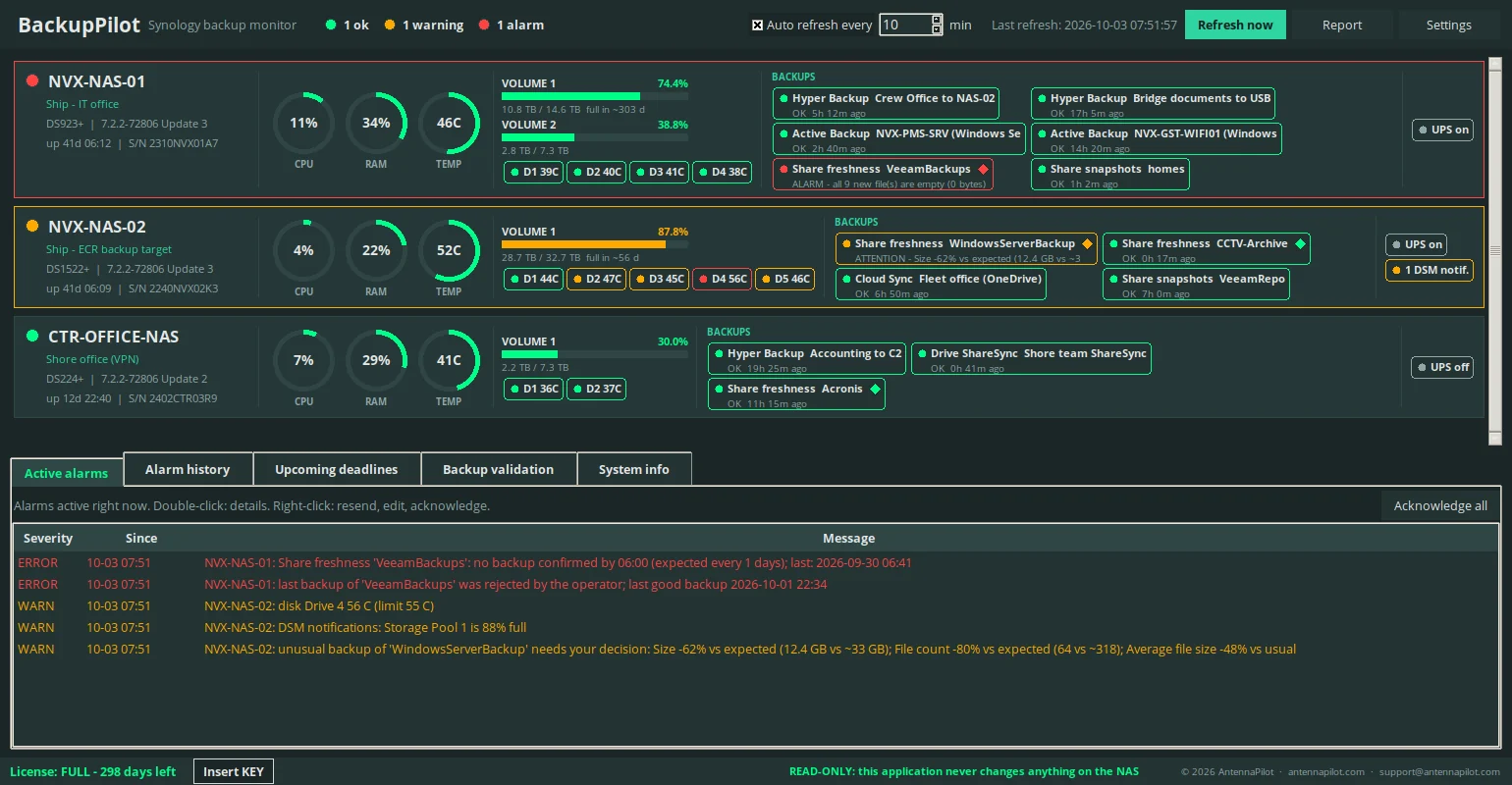
Read-only and no cloud: every call to the DSM API passes through a whitelist of read methods inside the program, there is no agent on the NAS, and nothing is sent to a cloud service.
The problem
A job that reports success is not always a backup you can use
- Synology's own tools report on Synology's own backup jobs: DSM notifications, Hyper Backup task reports and alerts, and, through the Active Insight cloud service, centralised Hyper Backup status with alerts for abnormal tasks. They do not let you set a deadline rule per backup source ("a confirmed backup every day by 06:00") and they do not see backups that other software writes into the NAS.
- Backups written to the NAS by third-party software (Veeam, Windows Server Backup, Acronis, robocopy, rsync) are invisible to DSM's backup reporting.
- A job can report success and still be wrong: one log file instead of a 30 GB archive, half the usual files, encrypted content. Status-based tools do not judge plausibility against history.
- Nobody watches a NAS console all day on a ship, at a remote site or in a small IT department.
Backup monitors
A deadline per source, re-checked every minute
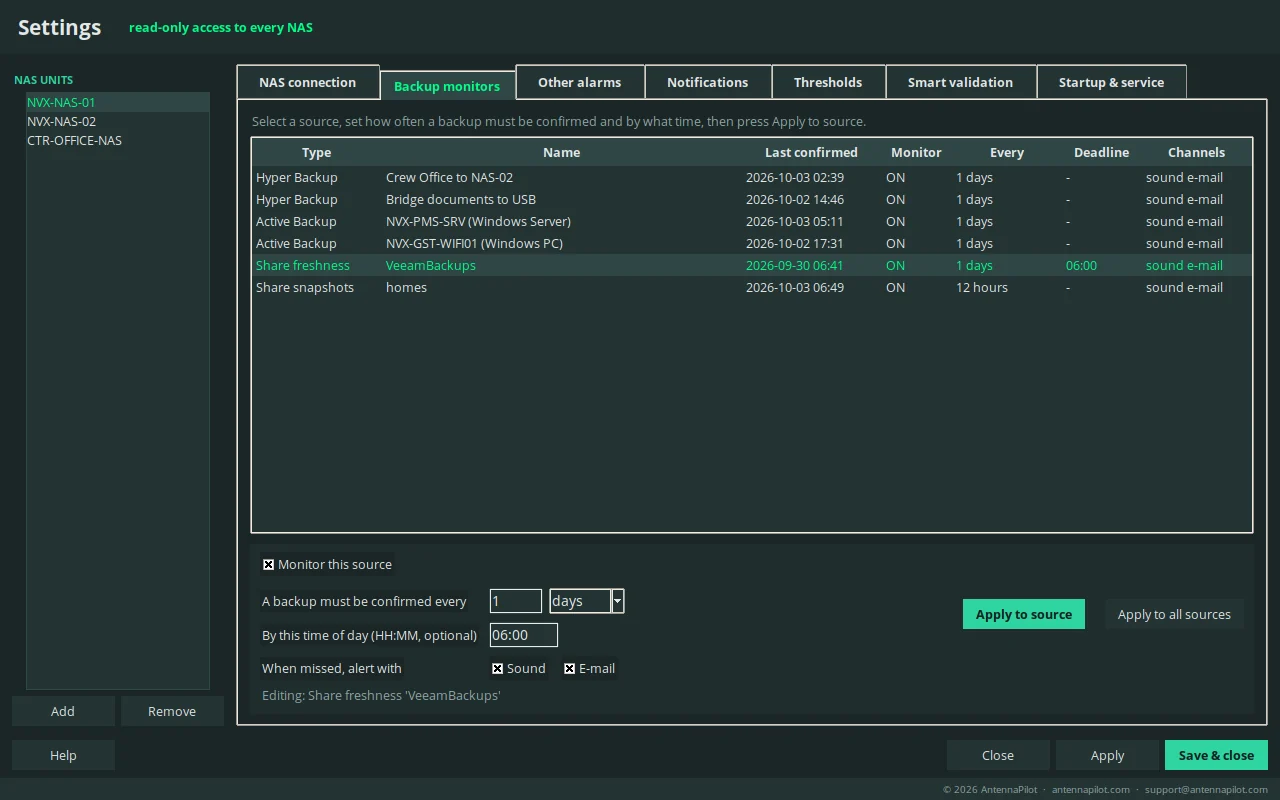
BackupPilot detects the backup sources of each NAS: Hyper Backup, Active Backup for Business, Snapshot Replication, Cloud Sync, Synology Drive ShareSync and Btrfs snapshots. Any shared folder where external backup software writes can be added as a watched folder: the newest file is the evidence of the last backup.
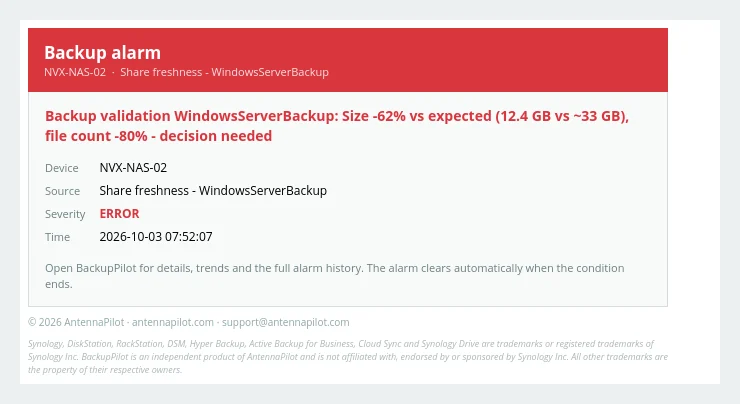
Per source you set that a backup must be confirmed every N hours or days, optionally by a time of day. “Confirmed” means the NAS reported it; BackupPilot never assumes. A late backup clears the alarm immediately. Alarms go out by sound and e-mail (Outlook or SMTP), with repeat reminders, escalation to a second address after N hours, maintenance windows, acknowledge, and a history with the time each alarm appeared and cleared.
Smart backup validation
When a backup arrives, the program also asks if it looks like the previous ones
Every backup run written into a watched folder is measured: files, bytes, average file size, change rate, file types, name patterns, duration, start time and weekday or day of the month. The run is compared with the confirmed history of that folder using robust statistics (median and MAD). Full and incremental runs are separated automatically, and the tolerance band is adaptive and capped.
An unusual run is not an alarm. It is quarantined and asks the operator for a decision: Correct - normal, Correct - exception, Correct - new normal, or Incorrect (a comment is required). A rejected backup moves the RPO clock back to the last good backup. Every finding is explained in words, for example “Size -62% vs expected (12.4 GB vs ~33 GB), file count -80%, usual for this weekday ~33 GB”.
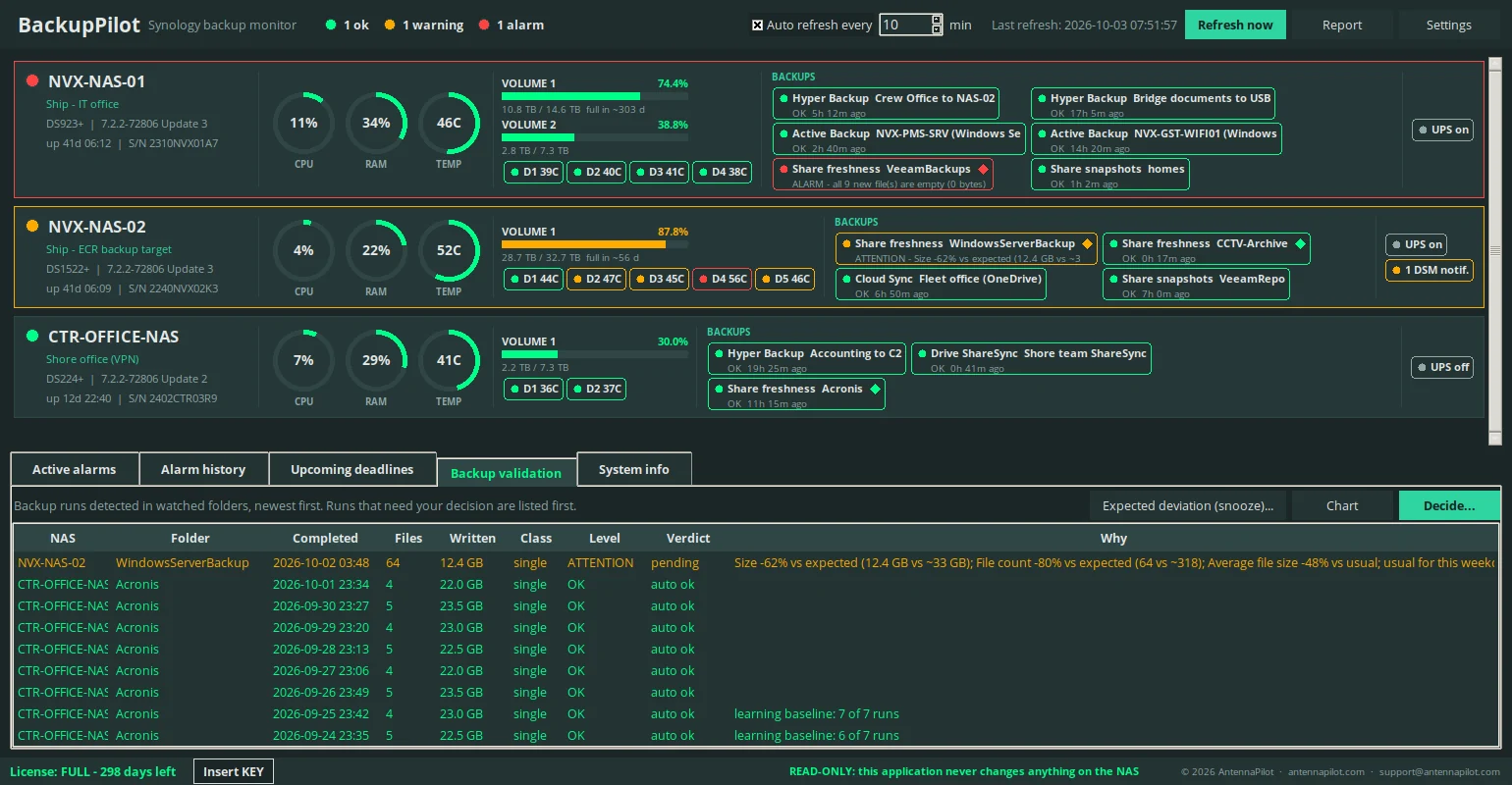
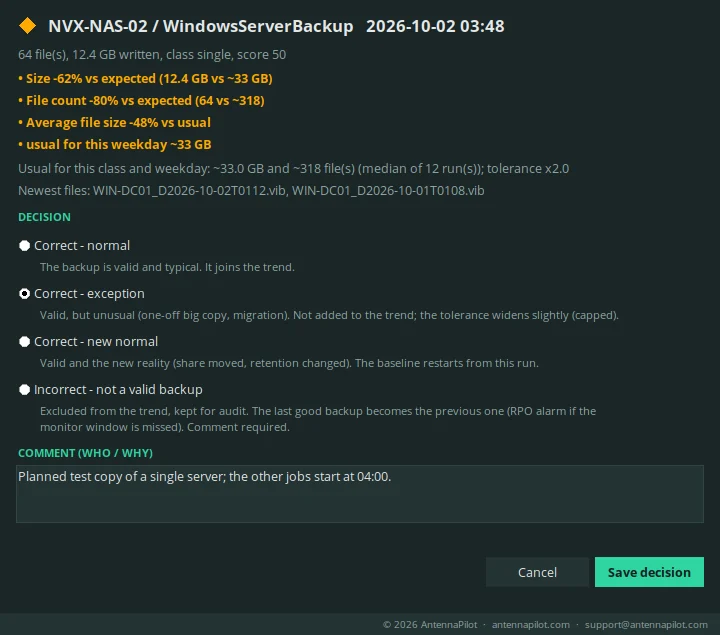
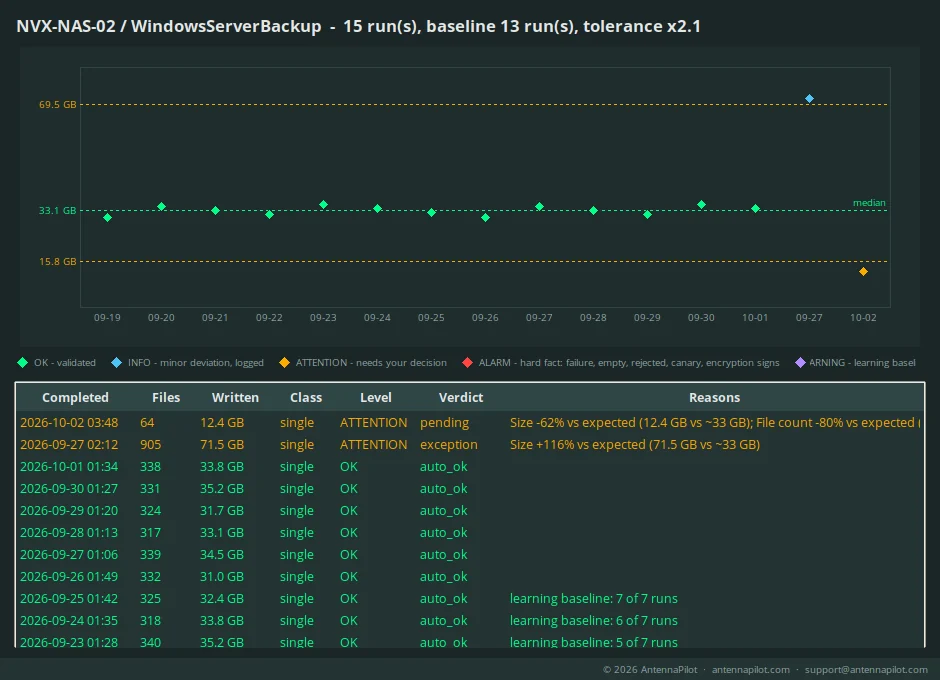
Hard facts are alarms, not questions: a backup that wrote 0 bytes, empty files, known ransomware extensions, canary (sentinel) files that are missing or changed, and, if you switch it on, failed format-signature or entropy checks on a small sample of files. All of this is read-only.
Reports and trends
A report that never claims a backup is fine without a rule
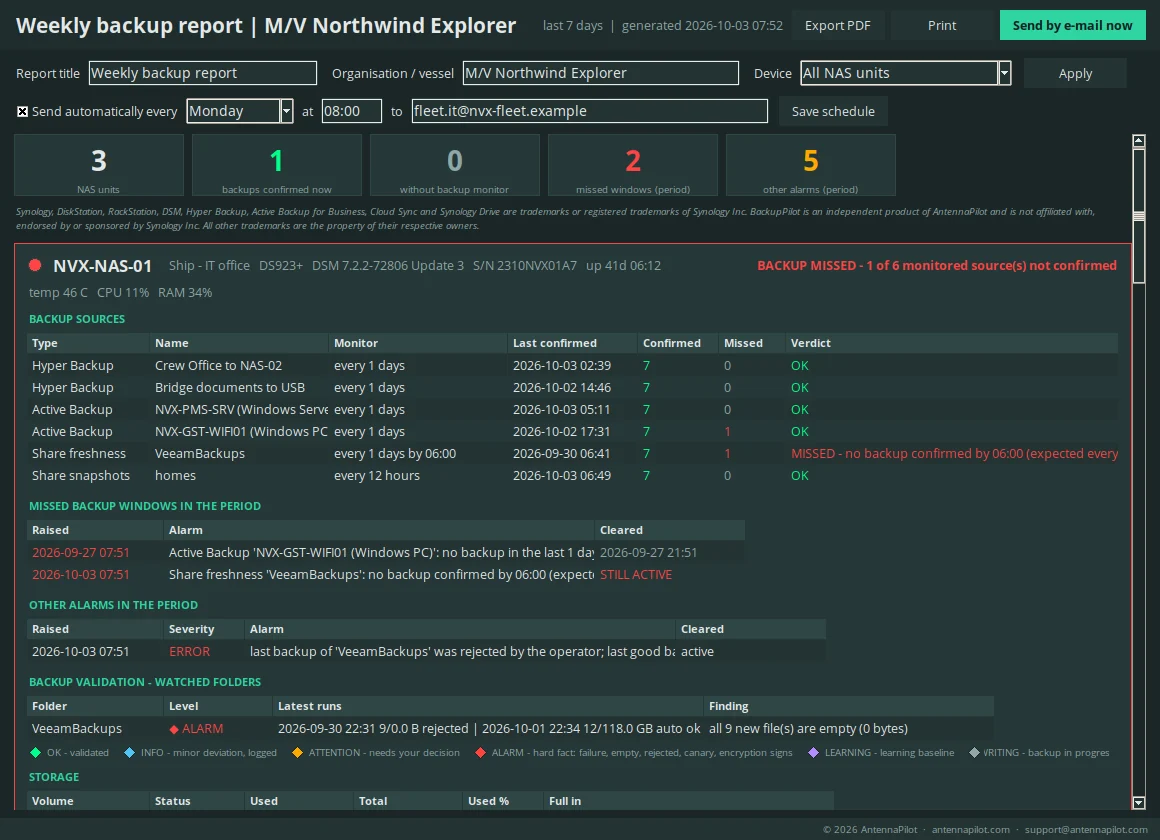
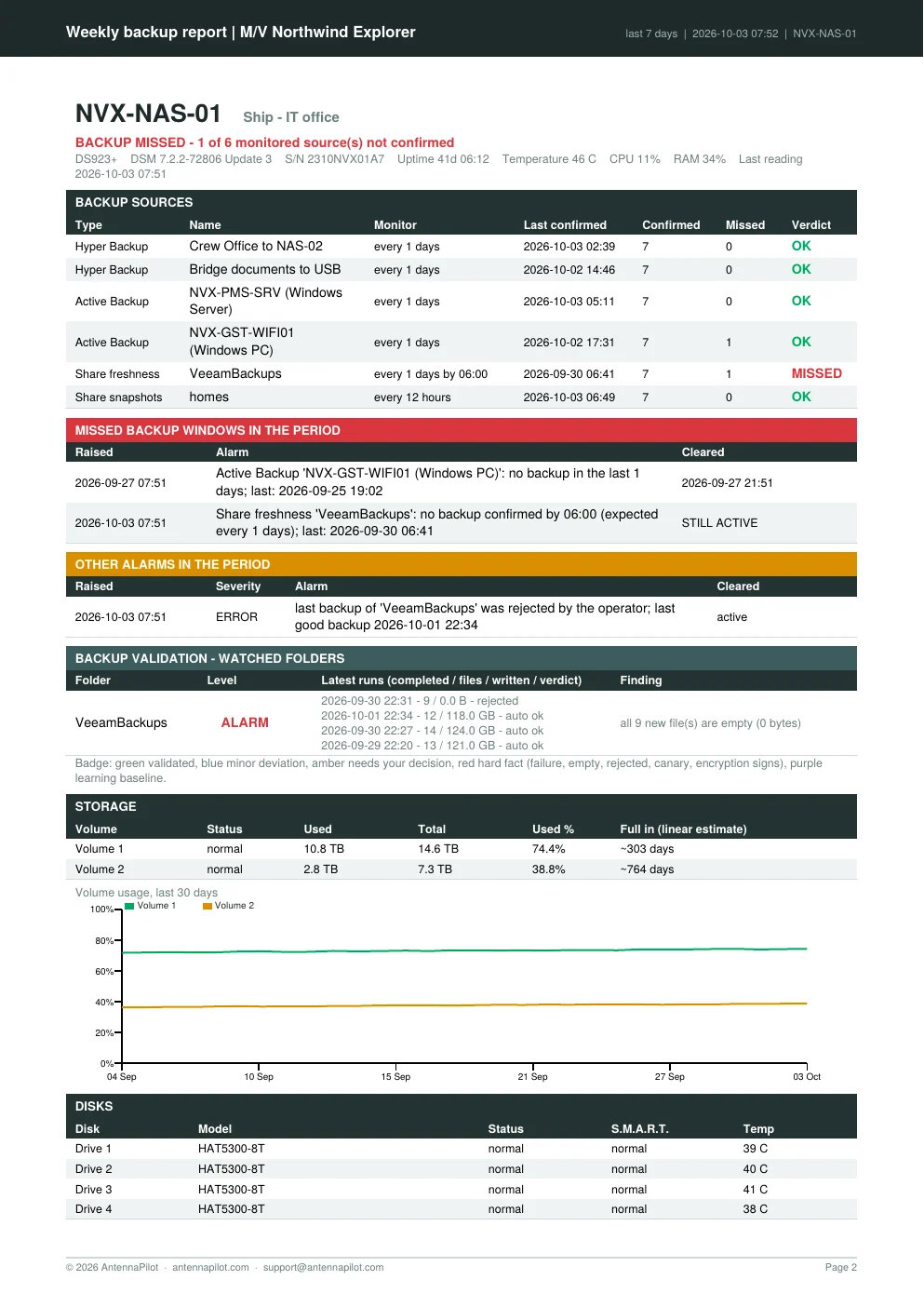
The backup report opens on screen, then as PDF (export or print) or as e-mail with the PDF attached and an HTML summary with the alarms first. It can be scheduled weekly, for one device or for all, with an editable title and organisation line. A device without a backup rule is shown as “NO BACKUP MONITOR CONFIGURED”, never as fine. Trends show 30 days of volume usage and disk temperatures with a linear “full in ~N days” estimate.
Comparison
Where BackupPilot sits among the tools you may already have
| Capability | Synology built-in | Generic monitors | Backup-software monitors | BackupPilot |
|---|---|---|---|---|
| Job finished / failed notification | Yes | Via SNMP traps or logs | Yes | Yes, with appear / clear history |
| Alarm when no successful backup exists by a deadline, including jobs that never ran | Partly - Active Insight flags abnormal Hyper Backup tasks; no per-source deadline rule | Custom scripting | Yes, for supported products ("no successful backup in N days", "no results") | Yes - per source, every N hours/days + optional deadline, re-checked every minute |
| Backups written by third-party software into NAS folders | No | Folder size / age sensors | Only their own product | Yes - watched folders |
| Plausibility of each run vs confirmed history (size, files, average size, change rate, types, names; full/incremental) | No | Thresholds only | Product-specific job statistics | Yes - smart validation |
| Operator verdicts that shape the trend, quarantine, audit trail | No | No | Not as a built-in workflow | Yes |
| RPO from the last good backup after a rejection | No | No | Partly (last successful job) | Yes |
| Canary files, ransomware-extension and format-signature checks | No | No | Some products, own backups | Yes, optional, read-only |
| NAS health (volumes, disks, S.M.A.R.T., temperatures, DSM notifications, Security Advisor, updates) | Yes; centralised in Active Insight | Yes | No | Yes, thresholds + alarms ON/OFF |
| Several NAS, one screen | Active Insight (cloud, Synology Account) | Yes (monitoring server) | Not the NAS itself | Yes - local, no cloud |
| Report with charts per device | Active Insight reports (cloud) | Yes, generic | Yes | Yes - screen, PDF, print, weekly e-mail |
| Read-only guarantee enforced in the program | n/a | Depends on credentials | Depends on product | Yes, blocked-call counter |
| Restore test / comparison with source | Hyper Backup integrity check | No | Yes, own product | No - read-only by design |
Based on publicly documented features in October 2026. Products change; check current documentation before a purchase decision. Veeam, Acronis, PRTG, Zabbix, Checkmk and Backup Radar are named only to describe categories of tools; they are trademarks of their respective owners.
Original features
What is specific to BackupPilot
- Deadline logic (“every day by 06:00”) instead of “last job status”.
- Watched folders turn any third-party backup into a monitored source.
- Smart validation with the human in the loop: four decisions, quarantine, adaptive capped tolerance, RPO from the last good backup.
- Canary files as a direct proof that the job copies what it should.
- Device states that refuse to say “all backups OK” when no rule exists.
- A read-only guarantee you can audit: the whitelist is in the program and the blocked-call counter is shown in the System info tab.
- Everything explained in words (alarms, report findings, tooltips) so a non-specialist on watch can act in seconds.
Limits
What BackupPilot does not do
It does not perform, restore or modify backups. It does not run on the NAS. It does not monitor other NAS brands. It does not replace the integrity check or the restore test of the backup software: it tells you when a backup stops looking like the previous ones and shows why.
Try it on your NAS for 24 hours. Download the 24-hour demo (one NAS, all features), or request an activation key: send the fingerprint shown in the application to support@antennapilot.com. Licensed per computer.
Screenshots show fictional data. © 2026 AntennaPilot · antennapilot.com · support@antennapilot.com
Synology, DiskStation, RackStation, DSM, Hyper Backup, Active Backup for Business, Cloud Sync and Synology Drive are trademarks or registered trademarks of Synology Inc. BackupPilot is an independent product of AntennaPilot and is not affiliated with, endorsed by or sponsored by Synology Inc. All other trademarks are the property of their respective owners.